
What is OmniOffloader?
Your media library is usually the biggest part of a WordPress site. OmniOffloader moves it to cloud object storage, such as Amazon S3 or Cloudflare R2, and serves it from your own domain or CDN. This frees the disk space the media was using on your server.
It does this without changing a single URL in your content. Nothing in your database is search-replaced.
How it works
Section titled “How it works”- You connect a bucket. Pick a storage provider, enter its keys and your CDN or custom domain, and click Test Connection.
- Media is copied to the cloud. New uploads are offloaded automatically in the background. Media you already have is moved with Bulk Offload or WP-CLI. Each upload includes the original, every thumbnail, the
-scaledversion and WebP/AVIF sources. - URLs are rewritten as pages render. Images, galleries, video, audio,
srcsetand the other media on your pages are served from the cloud. Your posts and page builders keep working as before. See Serving media from your CDN. - Local files follow your retention policy. Keep everything on the server, delete only thumbnails, or remove all local copies. See Retention policies. A local file is only deleted after its upload is confirmed in the bucket.
- You can always go back. Bring Back downloads everything to your server again and serves it locally.
Why offload media?
Section titled “Why offload media?”- Reclaim disk space. Object storage costs a fraction of hosting disk.
- Faster media delivery. Files served from a CDN edge load closer to your visitors.
- Lighter backups and migrations. A site without gigabytes of uploads is much quicker to back up and move.
- No lock-in. Bring Back reverses everything whenever you want.
Who is it for?
Section titled “Who is it for?”OmniOffloader runs on a small shared hosting plan just as well as on a VPS or dedicated server. Bulk jobs run in the background inside one PHP process, and you choose how fast they go with the Transfer Speed setting.
The admin screens
Section titled “The admin screens”After activation, you’ll find OmniOffloader in the WordPress admin menu, with five screens:
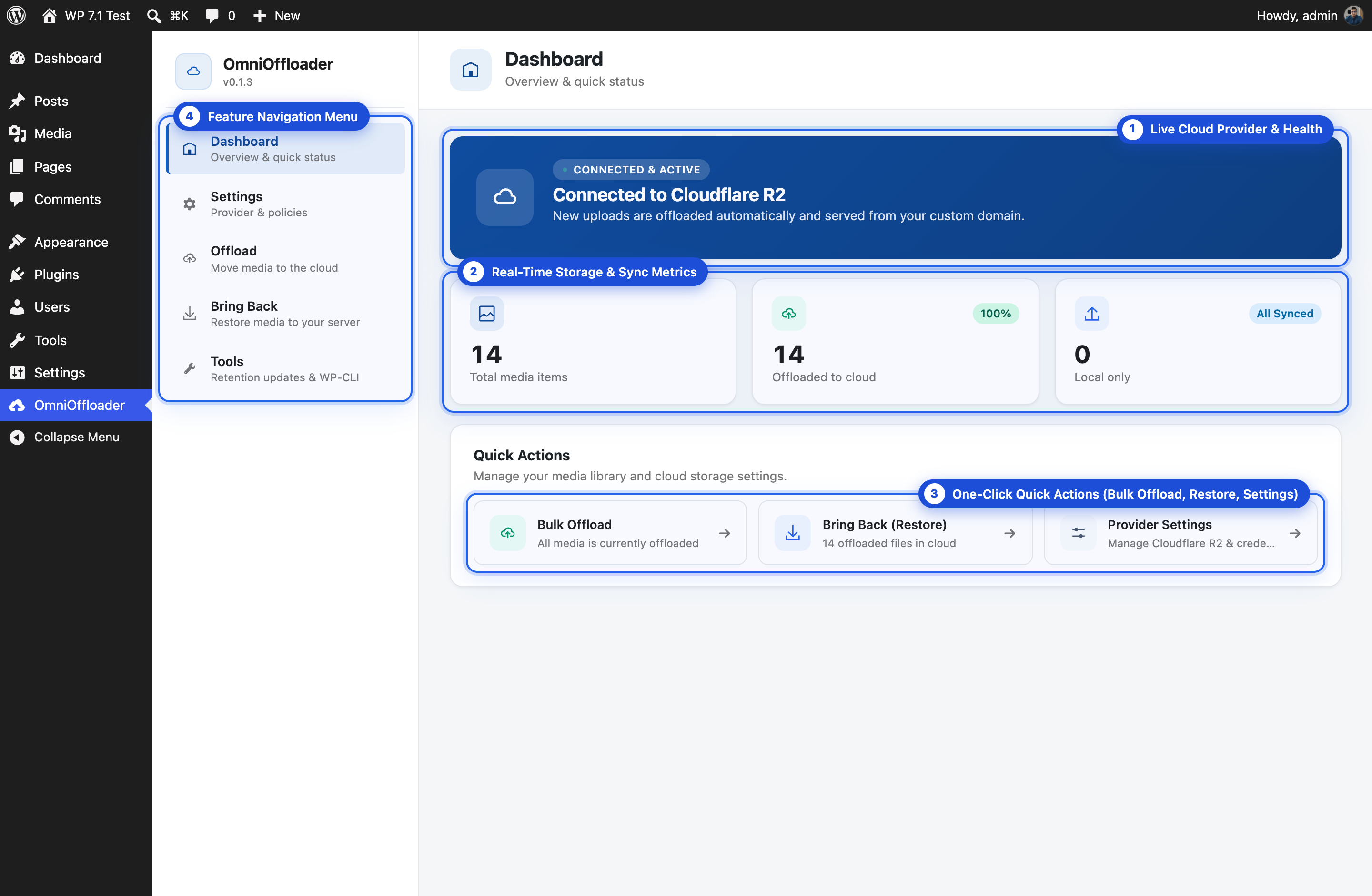
| Screen | What it’s for |
|---|---|
| Dashboard | Overview and quick status |
| Settings | Provider, credentials, retention policy and behaviour |
| Offload | Move existing media to the cloud |
| Bring Back | Restore media to your server |
| Tools | Apply a new retention policy to existing media, and the WP-CLI reference |
The Media Library also gets a status column, badges, row actions and bulk actions. See Media Library integration.
Requirements
Section titled “Requirements”- WordPress 6.6 or newer
- PHP 8.1 or newer
- A bucket with one of the supported storage providers
See Compatibility for hosting, caching and multisite notes.